Omarchy on a PlayStation 4, with Linux 6.18
I ported Omarchy to a PS4 Slim and built the Linux 6.18 kernel port underneath it. USB boot, a stubborn HDMI bridge, and a Wayland desktop on console hardware.
- #linux
- #ps4
- #kernel
- #omarchy
My PlayStation 4 boots into Omarchy. Hyprland manages the windows, Quickshell draws the desktop shell, and a native Wayland terminal opens when I press Super+Enter. Underneath it is Linux 6.18.44, with the PS4 Baikal patch set.
Getting that desktop onto the screen meant working through the whole stack: kernel, storage, display, session startup, and the assumptions a normal Linux desktop makes about its hardware. The result lives in two repositories: omarchy-ps4 for the desktop and boot integration, and linux-ps4 for the kernel builds.
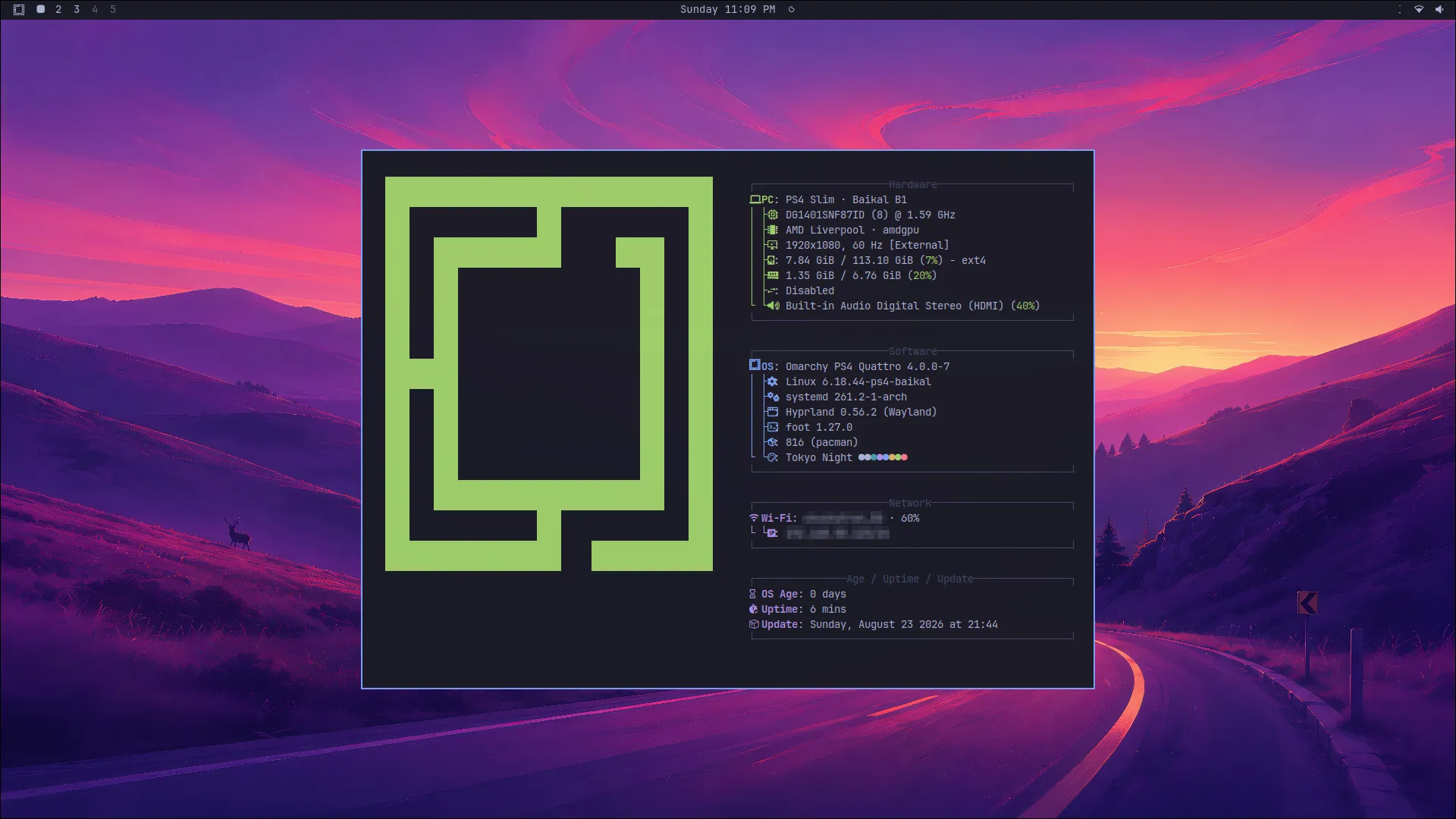
A console needs its own way in
The tested machine is a PS4 Slim with a Baikal B1 southbridge. That hardware detail matters: a successful boot on this console does not establish compatibility with every PS4 revision.
The system has two parts. A small PS4 application manages the kernel and early boot files. The Linux desktop lives on an external USB drive. A jailbroken console running GoldHEN provides the starting point for the Linux loader; this project builds on that existing work.
The boot manager keeps a previous boot set for rollback. Once the kernel starts, the early userspace finds the desktop filesystem by its OMARCHY-PS4 label. Device names such as /dev/sda depend on discovery order; a filesystem label gives the boot process a stable target.
Keeping Linux on USB also makes the project boundary concrete. The supported setup leaves the Sony partition map alone. Internal SATA has its own unresolved problems, and it should not be a dependency of getting a desktop running.
Bringing the kernel forward
The kernel repository carries a patch series over the upstream v6.18.44 source. It includes PS4 platform support, southbridge communication, the Liverpool display path, USB handling, and the MediaTek MT7668 Wi-Fi driver. Existing PS4 Linux work, including rmux’s patches, supplies essential pieces; the patch provenance records that lineage.
The porting work is in making those pieces agree with a newer kernel and proving what the resulting build actually does on hardware. An interrupt fix can get USB storage to enumerate while the monitor stays black. A display driver can register successfully while still failing to produce a picture.
Even the build host needed attention. Linux source contains filenames that collide on the usual case-insensitive macOS filesystem. The build wrapper uses a Linux filesystem in a named Docker volume under OrbStack, with the toolchain in a pinned Debian container.
Each build produces the kernel, configuration, modules, a manifest, and checksums. Those records let a hardware result point back to a specific artifact. They are also more useful than a folder full of kernels named “this-one-works.”
A black screen can hide a working system
The 6.18 bring-up log has a good example of why serial output matters. The external root filesystem mounted, systemd started, and LightDM reached the graphical target. The monitor still showed nothing.
There were several separate faults to work through. The PS4 display bridge needed the newer kernel’s managed allocation and registration lifetime. Fixing that removed reference-count corruption during display probing, but it did not restore the picture.
The decisive display change came later. The MN864729 bridge programming sequence needed its previously proven transaction boundaries restored: lane setup, HDMI update, and PLL/finalization stages. With those boundaries back in place, the hardware test reached a visible XFCE desktop on Linux 6.18.44.
UART—the serial connection carrying the kernel logs—made it possible to distinguish a dead machine from a working machine with a broken display path. Without that distinction, every black screen looks like the same bug.
Making Omarchy comfortable on the hardware
Once the kernel could support a desktop, Omarchy still needed a PS4-specific configuration. The current profile uses 1920×1080 at 60 Hz, scale 1, with compositor blur, shadows, and animations disabled. XFCE and LightDM remain available as a recovery environment while the Wayland path develops.
Some fixes were much smaller than the kernel work:
- macOS
._*metadata files had to be removed from portable bundles because the startup code treated them as Lua modules. - The Omarchy font needed registering with fontconfig to restore the bar icon.
- The terminal preference needed to point to native Wayland Foot instead of the recovery desktop’s terminal.
- Chromium needed software rendering after a hardware test isolated rectangular corruption to its GPU-rendered surface.
The PS4 fixes ledger separates accepted changes from candidates that still need hardware testing. That distinction keeps an experimental workaround from quietly becoming a support claim.
What you can use today
This is a hardware-development beta. The kernel release documents USB boot, HDMI output, internal Wi-Fi, and OpenGL/Vulkan smoke tests on the tested PS4 Slim. Desktop integration and repeated cold-boot acceptance have their own remaining checks. Ethernet, audio, Bluetooth, internal storage, and other PS4 revisions should be checked against the current repository status before assuming they work.
The PS4 application and kernel releases are available; at the time of writing, the USB root filesystem is not publicly released. Start with the project README for the current download and compatibility information, or watch the boot-to-desktop demo.
The useful milestone is a complete path from a console booting its own software to a Linux desktop you can interact with. The next part is making that path repeatable enough that someone else can follow it without inheriting the entire debugging session.