Palovbek: a fruit fly cooks plov in your browser
166,700 simulated neurons, a six-legged chef, and an Uzbek kitchen. How I connected a browser fly-brain simulation to recipe-guided plov cooking.
- #webgpu
- #simulation
- #threejs
- #plov
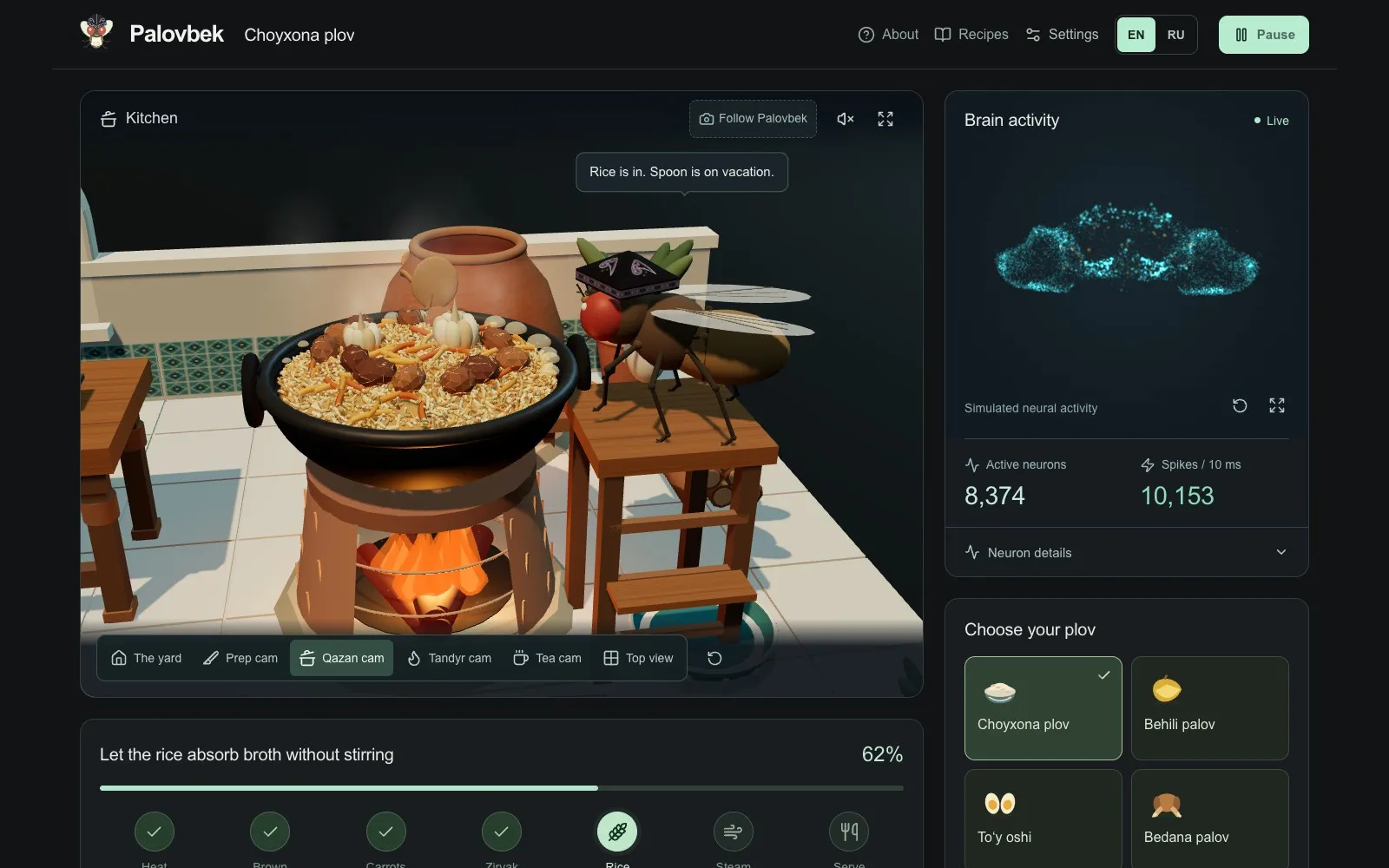
There is a fruit fly in a do‘ppi standing over a qazan in your browser. He chops carrots, stirs the zirvak, layers the rice, and waits for the plov. Beside the kitchen, a neural activity view shows what the simulated network is doing.
His name is Palovbek. You can watch him cook at plov.mrz.sh.
The project connects a fruit-fly neural simulation to a 3D Uzbek kitchen. Both run locally in the browser. The recipe determines the cooking sequence; measured neural activity influences portions and short pauses along the way.
The brain was already in the browser
The starting point was Xenova’s fruit-fly simulation. It already provided a browser engine for running a simplified neural model over a fly connectome—a map of neurons and the connections between them.
I adapted that engine and connected it to Palovbek’s kitchen. The browser graph contains 166,700 neurons and 25,582,938 directed weighted connections, derived from the MaleCNS dataset. Credit for the underlying data belongs to the MaleCNS collaborators, including FlyEM / HHMI Janelia, the University of Cambridge, the MRC Laboratory of Molecular Biology, and Google Research. The project’s attribution file records the sources, changes, and licenses.
The model is called leaky integrate-and-fire. Each simulated neuron accumulates input, its voltage decays over time, and crossing a threshold produces a spike. That spike can affect connected neurons. It is a useful computational model with substantial simplifications; its activity should be interpreted in those terms.
Palovbek also has an optional Python experiment using a different neuron cohort. The live browser version uses the browser graph and engine, so the two sets of measurements need to stay separate.
Who decides what goes in the qazan?
The cooking loop has a few clear responsibilities:
- The kitchen state supplies engineered sensory cues to the network.
- The neural engine advances the simulation and measures output spikes.
- A readout maps those spikes to a portion adjustment and a short hesitation.
- The recipe controller checks cooking order and readiness before the next action.
For example, a portion factor can vary between 0.8 and 1.2. That changes quantities such as grams of rice or millilitres of oil. Whole ingredients keep their recipe counts. Measured output activity also selects a short wait before pickup.
The recipe handles the steps that make it plov: heating oil, frying onion and lamb, checking browning, adding carrots, building zirvak, layering rice, steaming, resting, and serving. Once the rice goes in, the controller does not stir it. Quantity changes feed into the kitchen’s browning and hydration checks.
The network has not learned to cook. The current version uses a fixed connectome and an authored readout. The body animation, kitchen rules, and dialogue are software I built around it. Training a cooking policy would be a separate experiment, with its own objective, saved parameters, and tests.
That still leaves something interesting to inspect: the neural simulation produces activity that changes parts of a cooking episode, while the recipe gives those changes a clear context.
A large download with a small hosting job
The compressed graph assets total about 79 MB. Cloudflare serves the files; the visitor’s browser runs the simulation. Each visit has its own brain state and cooking session.
The engine runs in a Web Worker, away from the page’s main interface work, and uses WebGPU for the supported GPU path. The 3D scene renders the states it receives. This lets the kitchen, controls, and neural measurements share one browser experience without requiring a hosted Python process or model API.
Getting the files into that worker was its own engineering task. One failure came from double decompression: the server identified a .gz asset as HTTP-compressed content, the browser decoded it, and then the model loader tried to decompress those already-decoded bytes again.
The fix was to serve the compressed model payloads with .dat filenames and let the loader own decompression. Their payload bytes and checksums stayed the same. The distinction is small, but it sits directly between a working neural engine and a loading screen that never finishes.
Downloads are pinned and checked by hash. Verified chunks can be cached for later visits; a corrupt chunk can be discarded and retried individually. A reload starts a fresh simulation while reusing the downloaded assets. It does not restore the previous network’s full state.
Checking that the activity is real computation
The browser audit tests signal propagation through the actual graph. In one short experiment, stimulating a selected group of visual neurons produced spikes elsewhere in the network. Turning recurrent transmission off restricted activity to the stimulated group.
That is a more useful check than whether the dots look lively. The display samples actual neuron positions, and a point’s brightness comes from its simulated spikes. The complete graph participates in computation even though the 3D view shows only a sample.
The full-graph CPU/GPU comparison differed by one spike at one neuron in the recorded trial. It demonstrates a close numerical result for that test, with threshold sensitivity still present. It does not establish biological accuracy or guarantee identical trajectories on every device.
Cooking episodes also produce downloadable logs: actions, quantities, neural readouts, timing, and outcomes. They make it possible to inspect what happened after the animation is over.
A kitchen people can actually open
The app checks whether a usable WebGPU device can initialize the model. If that path fails, an explicitly labeled cooking demo runs instead, with an illustrative brain view. Download failures remain retryable. A browser exposing a GPU API is only the first step; the full model still has to fit and initialize.
There are four recipes, English and Russian interfaces, pause controls, and a fresh-cook action. The character wears a do‘ppi, cooks in a qazan, and has a porcelain tea set nearby. Those details give the simulation somewhere specific to live.
Open plov.mrz.sh, load the brain, and watch the rice go in. The source includes the kitchen, the browser integration, the audit, and the upstream credits. The fly is following a recipe. There is still a whole network firing while he does it.